Showing posts with label random. Show all posts

Creating a Birthday Application in Java

Problem:

Assume that each month consists of 30 days. One year, then, consists of 30×12 = 360 days, i.e., there are 360 different possible birthdays. Write three programs named Problem3a.java, Problem3b.java and Problem3c.java to answer the questions below. Each of your programs should simulate choosing people at random and checking their birthdays.

a. In Problem3a.java, generate 100 birthdays at random (a number from 0 to 359), and store them in an array of size 100. The program asks the user to enter the current date (day [any number between 1 and 30] and month [any number between 1 and 12]) and determines whether any of the people have their birthday today (i.e. on the entered date). If so, display a Happy Birthday message to the found person; otherwise display the message “No one has his birthday today”. Example: if person 14 was found to have his birthday on the date entered by the user, the program displays the message: Happy Birthday to P14!

b. In Problem3b.java, you have to find how many random people you have to select before you find three people who share the same birthday? To answer this question, you have to generate birthdays at random (a number from 0 to 359) and keep track of how many people have been found with each birthday. An algorithm for this program is shown below:

Let count = 0 //count the number of people/birthdays generated

Repeat:

Select a birthday at random

Add one to count

Add one to the number of times that birthday has been found

If this is the third time that birthday has occurred:

break out of the loop

Output the count

c. In Problem3c.java, you have to find out how many different people you have to check before you find at least one person with a birthday on each of the 360 days of the year?


Output:

Not needed.

Solution:

/** ----------------------------Problem3a--------------------------- */
import java.util.*;
import java.math.*;
import java.util.Random;
public class Problem3a 
{
 public static void main(String args[])
 {
  int a[] = new int[100];
  int found = -1;
  
  Random ran = new Random();
  Scanner scan = new Scanner(System.in);
  
  for(int i = 0; i < 100; i++)
  {
   a[i] = ran.nextInt(360);
   //System.out.println(a[i]); 
//If you want to print the array of the random numbers generated
  }
  
  System.out.println("Enter day:");
  int day = scan.nextInt();
  System.out.println("Enter month:");
  int month = scan.nextInt();
  
  int val = 30 * (month - 1) + (day - 1);
  
  for(int i = 0; i < 100; i++)
  {
   if(a[i] == val)
   {
    found = i;
    break;
   }
  }
  
  if(found == -1)
  {
   System.out.println("No one has his birthday today");
  }
  else
  {
   System.out.println("Happy birthday P" + found);
  }
 }
    
}
/** ----------------------------Problem3b--------------------------- */
import java.util.*;
import java.math.*;
import java.util.Random;


public class Problem3b 
{
 public static void main(String args[])
 {
  int a[] = new int[360];
  int count = 0;
  Random ran = new Random();
  
  for(;;)
  {
   int r = ran.nextInt(360);
   count++;
   a[r]++;
   if(a[r] >= 3)
   {
    break;
   }
  }
  
  System.out.println("The count is: " + count);
 }  
}

/** ----------------------------Problem3c--------------------------- */
import java.util.*;
import java.math.*;
import java.util.Random;


public class Problem3c 
{
 public static void main(String args[])
 {
  int a[] = new int[360];
  int count = 0;
  Random ran = new Random();
  int done = 0;
  
  for(;;)
  {
   int r = ran.nextInt(360);
   count++;
   
   if(a[r] == 0)
    done++;
    
   a[r]++;
   
   if(done == 360)
    break; 
  }
  
  System.out.println("The count is: " + count);
 }  
}
Read More

Creating a Guessing Game in Java

Problem:

Write a class GuessingGame that simulates a simple guessing game. Initially, your program should generate a random integer between 1 and 1000 and print the following: "Guess the number between 1 and 1000" (without the quotes). Then, the user is asked to guess the number generated. If the user is correct, the program prints:
"Congratulations" (without the quotes).
Otherwise, if the number entered by the user is less than the generated number you print "Too cold" and when the number is above you print "Too hot". The game does not stop until the user has made a correct guess. Sample program output:

Output:

Guess the number between 1 and 1000

500

Too Cold

750

Too Hot
600
Congratulations

Solution:

import java.util.*;
public class Problem1
{
    public static void main (String args[])
    {
 Random random = new Random();
 int a = random.nextInt(1000) + 1;
 Scanner scan = new Scanner(System.in);
 int guess = 0;
 while (a != guess)
 {
            System.out.println("Guess the number between 1 and 1000:");
            guess = scan.nextInt();
            if (guess < a)
  System.out.println("Too cold!");
            else
  System.out.println("Too hot!");
 }
 if (a == guess)
            System.out.println("Congratulations!");
   
    }
}
Read More

Generating Phone Number in Java

Problem:

Write an application that creates and prints a random phone number of the form xxx-xxx-xxxx. Include the dashed in the output. Do not let the first three digits contain an 8 or 9. And make sure that the second set of three digits is not greater than 742 (i.e. ≤ 742). Hint: Think through the easiest way to construct he phone number. Each digit does not have to be determined separately.

Output:

016-326-5981

Solution:

import java.util.Random;
public class Problem4 {

   public static void main(String args[])
   {
     Random generator = new Random();


     // Generate 3 random numbers between 0 & 7 for the first part of the phone number
  int one = generator.nextInt(8);
  int two = generator.nextInt(8);
  int three = generator.nextInt(8);
  int fourtosix = generator.nextInt(743);
  int seventoten = generator.nextInt(10000);
  String sOne = "" + (one);
  String sTwo = "" + (two);
  String sThree = "" + (three);
  String sFourtosix = "";
  String sSeventoten = "";
  if (fourtosix >= 0 && fourtosix < 10)
   sFourtosix = "00" + (fourtosix);
   else
    if(fourtosix < 100)
     sFourtosix = "0" + (fourtosix);
    else
     sFourtosix = "" + (fourtosix);
     
  if (seventoten >= 0 && seventoten < 10)
   sSeventoten = "000" + (seventoten);
   else
    if(seventoten < 100)
     sSeventoten = "00" + (seventoten);
    else
     if(seventoten < 1000)
      sSeventoten = "0" + (seventoten);
      else
       sSeventoten = "" + (seventoten);  
 

  //Print the phonenumber with this format xxx-xxx-xxxx
  System.out.printf(sOne + sTwo + sThree +"-" +sFourtosix + "-" + sSeventoten);
   }


}
Read More

Rolling Dices through Random Class in Java

Problem:

Nour and Jad start-out the game with a cumulative score of zero. Then each player rolls three dices and a random number appears for each dice. The summation of each number is added in each player’s score. The winner is the player that has the highest score in x turns based on what the players initially decided. Note: If Jad’s score and Nour’s score are equal, let the program prints: Jad and Nour have equal scores, else let the program print who is the winner.

The output should be as follows:

Output:

Please enter the number of turns:
3
Jad's score is: 26
Nour's score is: 27
Nour is the winner

Solution:

import java.util.Random;
import java.util.Scanner;
/**
 *
 * @author George Chalhoub
 */
public class Problem3 {
    public static void main(String args[]){
        Scanner input = new Scanner(System.in);
        Random randomdice = new Random();
     
        int sumjad = 0;
        int sumnour = 0;
   
        int jadDice1 = randomdice.nextInt(7);
        int jadDice2 = randomdice.nextInt(7);
        int jadDice3 = randomdice.nextInt(7);
        int nourDice1 = randomdice.nextInt(7);
        int nourDice2 = randomdice.nextInt(7);
        int nourDice3 = randomdice.nextInt(7);
        sumjad = sumjad + jadDice1 + jadDice2 + jadDice3;
        sumnour = sumnour + nourDice1 + nourDice2 + nourDice3;
     
        System.out.println("Jad's score is: " + sumjad);
        System.out.println("Nour's score is: " + sumnour);
        if (sumjad == sumnour)
                System.out.println("Jad and Nour have the same scores");
        else
            if (sumjad > sumnour)
                System.out.println("Jad is the winner");
                else
                    System.out.println("Nour is the winner");
    }
    
}

    
Read More

Using the Random Class in Java to Roll Dices

Problem:

Write an application that simulates the rolling of two dice. The application should use an object of a class Random once to roll the first die and again to roll the second die. The sum of the two values should then be calculated. Each die can show an integer value from 1 to 6. The sum of the values will vary from 2 to 12 with 7 being the most frequent sum, and 2 and 12 the less frequent sum. Your application should roll the dice 3600 times. Use one dimensional array to tally the number of times each possible sum appears. Display the result for example: 36 played that had the sum of 11.


Output:

101 played that had the sum of 2
179 played that had the sum of 3
305 played that had the sum of 4
437 played that had the sum of 5
515 played that had the sum of 6
606 played that had the sum of 7
493 played that had the sum of 8
377 played that had the sum of 9
303 played that had the sum of 10
182 played that had the sum of 11
102 played that had the sum of 12


Solution:

import java.util.Random;

public class Problem
{
  public static void main (String[] args)
  {
    Random d = new Random();
    int[] nums = new int[11];
    int a =0,b=0;
    for (int i =0;i<3600;i++)
    {
    a = d.nextInt(6) + 1;
    b = d.nextInt(6) + 1;
    switch(a+b)
    {
    case 2:
      nums[0]++;
      break;
    case 3:
      nums[1]++;
      break;
    case 4:
      nums[2]++;
      break;
    case 5:
      nums[3]++;
      break;
    case 6:
      nums[4]++;
      break;
    case 7:
      nums[5]++;
      break;
    case 8:
      nums[6]++;
      break;
    case 9:
      nums[7]++;
      break;
    case 10:
      nums[8]++;
      break;
    case 11:
      nums[9]++;
      break;
    case 12:
      nums[10]++;
      break;
    }

    }
    
    for (int i =0;i<11;i++)
      System.out.println(nums[i] + 
      " played that had the sum of " + (i+2));
  }
}
Read More

Randomly Filling a TicTacToe board in Java

Problem:

Write a program that randomly fills in 0s and 1s into a TicTacToe board, prints the board, and finds the rows, columns, or diagonals with all 0s or 1s. Use a two-dimensional array to represent a TicTacToe board.


Output:

101
111
110
All 1s on column 0
All 1s on row 1
All 1s on diagonal 1

Solution:

public class TicTacToe2
{
  public static int[][] randomFill()
  {
    int[][] tictactoe = new int[3][3];
    for (int i =0;i<tictactoe.length;i++)
    {
      for (int j =0; j< tictactoe[i].length;j++)
      {
        tictactoe[i][j] = (int) (Math.random()*2);
        System.out.print(tictactoe[i][j]);
      }
      System.out.println();
    }
    return tictactoe;
  }
  
  public static void checkUp(int[][] tictactoe)
  {
    for (int i =0;i<3;i++)
    {
        if ( tictactoe[i][0] == tictactoe[i][1] && tictactoe[i][1] == tictactoe[i][2])
          System.out.println("All " + tictactoe[i][0] + "s on row " + i);
        
        if ( tictactoe[0][i] == tictactoe[1][i] && tictactoe[1][i] == tictactoe[2][i])
          System.out.println("All " + tictactoe[0][i] + "s on column " + i);
        
    }
    if ( tictactoe[0][0] == tictactoe[1][1] && tictactoe[1][1] == tictactoe[2][2])
      System.out.println("All " + tictactoe[0][0] + "s on diagonal " + 0);
    
    if ( tictactoe[1][2] == tictactoe[1][1] && tictactoe[1][1] == tictactoe[2][1])
      System.out.println("All " + tictactoe[0][0] + "s on diagonal " + 1);
  }
  public static void main (String[] args)
  {
    int[][] tictactoe = randomFill();
    checkUp(tictactoe);
  }
}
Read More

Shuffling Elements of a two-dimensional array

Problem:

In a java program, create random numbers in a two-dimensional array, then shuffle them!

Output:

Original array:
24 38 15
19 63 7
87 76 57

Shuffled array:
24 38 19
63 87 15
76 57 7


Solution:

public class twoDimentionalArrays
{
  public static void main (String[] args)
  {
    int[][] list = new int[3][3];
    for (int i =0;i<list.length;i++)
    {
      for (int j=0; j<list[0].length;j++)
      {
        list[i][j] = (int) (Math.random()*100);
      }
    }
    System.out.println("Original array:");
    for (int i =0;i<list.length;i++)
    {
      for(int j =0;j<list[0].length;j++)
      {
        System.out.print(list[i][j] + "\t");

      }
      System.out.println();
    }
    
    for (int i =0;i<list.length;i++)
    {
      for(int j =0;j<list[0].length;j++)
      {
        int i1 = (int) (Math.random()*list.length);
        int j1 = (int) (Math.random()*list[j].length);
        
        int temp = list[i][j];
        list[i][j] = list[i1][j1];
        list[i1][j1] = temp;
      }
    }
    System.out.println();
    System.out.println("Shuffeled array:");
    for (int i =0;i<list.length;i++)
    {
      for(int j =0;j<list[0].length;j++)
      {
        System.out.print(list[i][j] + "\t");

      }
      System.out.println();
    }
  }
}
Read More

Printing the Values of a Row of a Two-dimensional Array in Java

Problem:
Create a two-dimensional array, fill it randomly with values between 0 and 99, and then print the sum of the values per row.

Output:


Solution:

public class twoDimentionalArrays
{
  public static void main (String[] args)
  {
    int[][] list = new int[10][10];
    for (int i =0;i<list.length;i++)
    {
      for (int j=0; j<list[0].length;j++)
      {
        list[i][j] = (int) (Math.random()*100);
      }
    }
    
    for (int i =0;i<list.length;i++)
    {
      int sum = 0;
      for(int j =0;j<list[0].length;j++)
      {
        System.out.print(list[i][j] + "\t");
        sum+= list[i][j];
      }
      System.out.println("The sum of the row is " + sum);
    }
  }
}
Read More

Summing all the Values in a Two-dimensional Array after Printing it in Java

Problem:

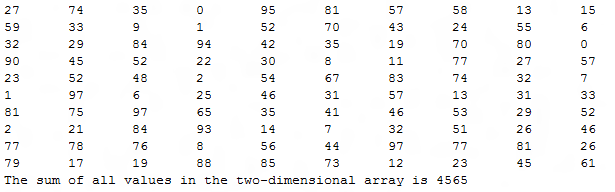
Create a two-dimensional array, fill it randomly with values between 0 and 99, calculates the sum of all the numbers and then print it as the picture shows.

Output:


Solution:

public class twoDimentionalArrays
{
  public static void main (String[] args)
  {
    int[][] list = new int[10][10];
    for (int i =0;i<list.length;i++)
    {
      for (int j=0; j<list[0].length;j++)
      {
        list[i][j] = (int) (Math.random()*100);
      }
    }
    
    for (int i =0;i<list.length;i++)
    {
      for(int j =0;j<list[0].length;j++)
      {
        System.out.print(list[i][j] + "\t");
      }
      System.out.println();
    }
    int sum =0;
    for (int i =0;i<list.length;i++)
    {
      for(int j =0;j<list[0].length;j++)
      {
        sum+=list[i][j];
      }
    }
    
    System.out.println("The sum of all values in the two-dimensional array is " + sum);
  }
}
Read More

Printing a Two-dimensional Array after assigning random values in Java

Problem:

Create a two-dimensional array, fill it randomly with values between 0 and 99, and then print it.

Output:


Solution:

public class twoDimentionalArrays
{
  public static void main (String[] args)
  {
    int[][] list = new int[10][10];
    for (int i =0;i<list.length;i++)
    {
      for (int j=0; j<list[0].length;j++)
      {
        list[i][j] = (int) (Math.random()*100);
      }
    }
    
    for (int i =0;i<list.length;i++)
    {
      for(int j =0;j<list[0].length;j++)
      {
        System.out.print(list[i][j] + "\t");
      }
      System.out.println();
    }
  }
}
Read More

Creating a two-dimensional array and randomly filling it in Java

Problem:

Create a two-dimensional array and randomly fill it:


Solution:

public class twoDimentionalArrays
{
  public static void main (String[] args)
  {
    int[][] list = new int[10][10];
    for (int i =0;i<list.length;i++)
    {
      for (int j=0; j<list[0].length;j++)
      {
        list[i][j] = (int) (Math.random()*100);
      }
    }
  }
}
Read More

Generating Integers and Checking the Count of Each in Java

Problem:

(Counting single digits) Write a program that generates one hundred random integers between 0 and 9 and displays the count for each number. Hint: Use (int)(Math.random() * 10) to generate a random integer between 0 and 9. Use an array of ten integers, say counts, to store the counts for the number of 0's, 1's, ..., 9's.


Solution:

public class RandomNumbers {
 
 public static void main(String[] args) {
  int[] frequency = new int[10];
  
  for(int i = 0; i < 100; i++){
   int randomNumber = generate();
   frequency[randomNumber]++;
  }
  
  printArray(frequency);
 }
 
 private static int generate(){
  return (int)(Math.random() * 10);
 }
 
 private static void printArray(int[] array){
  for(int i = 0, size = array.length; i < size; i++ ){
   System.out.println(i + " frequence -> " + array[i]);
  }
 }
 
}
Read More

Generating Lowercase Letters Randomly and Couting the Occurence of Each in Java

Problem:

Write a program that generates one hundred lowercase letters randomly and
counts the occurrences of each letter:


Output:

The lowercase letters are:
q u q i s a y n o j f o x i a o x m x n
x e n y l i b f h h r p j y c m q d b q
o i a z j a a w a b z e w s d g v u v b
y n a q s p f k d i f d d c z l z l j a
q w j v j m w f t e g z z x z l v f o i

The occurrences of each letter are:
8 a 4 b 2 c 5 d 3 e 6 f 2 g 2 h 6 i 6 j
1 k 4 l 3 m 4 n 5 o 2 p 6 q 1 r 3 s 1 t
2 u 4 v 4 w 5 x 4 y 7 z


Solution:

import java.util.Random;

 public class Count {
   /** Main method */
   public static void main(String args[]) {
     // Declare and create an array
      char[] chars = createArray();

     // Display the array
     System.out.println("The lowercase letters are:");
      displayArray(chars);
     // Count the occurrences of each letter
     int[] counts = countLetters(chars);
     
     // Display counts
     System.out.println();
     System.out.println("The occurrences of each letter are:");
      displayCounts(counts);
   }

   /** Create an array of characters */
   public static char[] createArray() {
     // Declare an array of characters and create it
     char[] chars = new char[100];
     Random generator = new Random();
     // Create lowercase letters randomly and assign
     // them to the array
     String S ="abcdefghijklmnopqrstuvwxyz";
     for (int i = 0; i < chars.length; i++) 
       chars[i] = (char) S.charAt(generator.nextInt(26));
     // Return the array
    return chars;
   } 
  
   /** Display the array of characters */
   
 public static void displayArray(char[] chars) {
     // Display the characters in the array 20 on each line
     for (int i = 0; i < chars.length; i++) {
       if ((i + 1) % 20 == 0)
         System.out.println(chars[i] + " ");
       else
        System.out.print(chars[i] + " ");
            }
          }
       
          /** Count the occurrences of each letter */
          public static int[] countLetters(char[] chars) {
            // Declare and create an array of 26 int
            int[] counts = new int[26];
       
            // For each lowercase letter in the array, count it
            for (int i = 0; i < chars.length; i++) 
              counts[chars[i] - 'a']++;
       
            return counts;
          }
       
          /** Display counts */
          public static void displayCounts(int[] counts) {
            for (int i = 0; i < counts.length; i++) {
              if ((i + 1) % 10 == 0)
                System.out.println(counts[i] + " " + (char)(i + 'a'));
              else
                System.out.print(counts[i] + " " + (char)(i + 'a') + " ");
            }
          }
       }
Read More

Follow Me

If you like our content, feel free to follow me to stay updated.

Subscribe

Enter your email address:

We hate spam as much as you do.

Upload Material

Got an exam, project, tutorial video, exercise, solutions, unsolved problem, question, solution manual? We are open to any coding material. Why not upload?

Upload

Copyright © 2012 - 2014 Java Problems  --  About  --  Attribution  --  Privacy Policy  --  Terms of Use  --  Contact