Showing posts with label loops. Show all posts

How to Represent a Month Value from Numbers in Java

Problem:

Write a program that would read an input from the user that represents the month value. Then the code will display the name of the month based on this value, using the switch statement. For example, if the user input is:

Output:

Please enter the month number:
4

The month selected is: APRIL

Solution:

import java.util.Scanner;

public class Problem2 {
     public static void main(String[] args) {
           Scanner input = new Scanner(System.in);
           System.out.println( "Please enter the number of the month:");
           int monthvalue = input.nextInt();
           String month;
           switch(monthvalue){
               case 1: month = "January";
                   break;
               case 2: month = "February";
                   break;
               case 3: month = "March";
                   break;
               case 4: month = "April";
                   break;
               case 5: month = "May";
                   break;
               case 6: month = "June";
                   break;
               case 7: month = "July";
                   break;
               case 8: month = "August";
                   break;
               case 9: month = "September";
                   break;
               case 10: month = "October";
                   break;
               case 11: month = "November";
                   break;
               case 12: month = "December";
                   break;
               default: month = "Invalid Month";
                   break;
           }
         
           System.out.println(month);
     }
}
Read More

Java > Warmup-2 > stringSplosion (CodingBat Solution)

Problem:

Given a non-empty string like "Code" return a string like "CCoCodCode".

stringSplosion("Code") → "CCoCodCode"
stringSplosion("abc") → "aababc"
stringSplosion("ab") → "aab"


Solution:

public String stringSplosion(String str) {
  int len = str.length();
  String temp = "";
  
  for (int i = 0; i < len + 1; i++)
    temp += str.substring(0,i);
  return temp;
}
Read More

Printing Pascal's Triangle in Java

Problem:

Print the shape seen below.


Solution:

public class Pyramid
{
  public static void main (String[] agrs)
  {
    int MAX = 7;
    int temp =1;
    for (int i =0;i<=MAX;i++)
    {
      temp =1;

      for (int j =MAX;j>i;j--)
      {
        System.out.print("\t");
      }
      
      for (int k =0;k<=2*(i-1)+2;k+=2)
      {
        System.out.print((temp) + "\t");
        temp+= temp;
      }
      temp/=2;

      for (int j =MAX;j>MAX;j--)
      {
        System.out.print("\t");
      }
      for (int k =0;k<=2*(i-1);k+=2)
      {
        temp/=2;
        System.out.print((temp) + "\t");
      }
      System.out.println();
    }
  }
}
Read More

Computing the Constant pi "π" in java

Problem:

You can computer π by using the following series seen below. Write a program that displays the value for  i 10000, 20000, and 100000.


Output:

For i = 10000 pi has a value of 3.1414926535900367
For i = 20000 pi has a value of 3.1415426535898203
For i = 30000 pi has a value of 3.1415593202564684
For i = 40000 pi has a value of 3.1415676535897927
For i = 50000 pi has a value of 3.141572653589808
For i = 60000 pi has a value of 3.1415759869231388
For i = 70000 pi has a value of 3.1415783678755265
For i = 80000 pi has a value of 3.1415801535898193
For i = 90000 pi has a value of 3.141581542478711
For i = 100000 pi has a value of 3.1415826535898224


Solution:

public class Pi
{
  public static void main (String[] args)
  {
    double n =0;
    for (int i =10000;i<=100000;i+=10000)
    {
      for (double j =1;j<=i;j+=2)
      {
        n+= ( ( 1.0/((2.0*j)-1.0) ) - ( 1.0/((2.0*j)+1.0) ) );
      }
      System.out.println("For i = " + i + " pi has a" +
          "value of " + (double) 4*n);
      
      n=0;
    }
  }
}
Read More

Calculating the Factors of a Number in Java

Problem:

Write a program that reads an integer and displays all its smallest factors in increasing order. For example, if the input integer is 120, the output should be as follows: 2, 2, 2, 3, 5.


Output:

1202 2 2 3 5


Solution:

public class Factors
{
  public static void main (String[] args)
  {
    java.util.Scanner scan = new java.util.Scanner(System.in);
    int N = scan.nextInt();
    for (int i =2;N>1;i++)
    {
      if(N%i == 0)
      {
        System.out.print(i +" ");
        
      N/=i;
      i=1;
      }
    }
  }
}
Read More

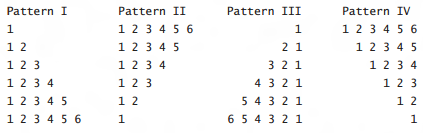
Printing The Four Basic Shapes in Java

Problem:

Print the shapes seen below.


Pattern I:


    int MAX = 5;
    for (int i =0;i<=MAX;i++)
    {
      for(int j =0;j<=i;j++)
      {
        System.out.print((j+1)+" ");
      }
      System.out.println();
    }


Pattern II:


    int MAX =5;
    for (int i =MAX;i>=0;i--)
    {
      for(int j =0;j<=i;j++)
      {
        System.out.print((j+1)+" ");
      }
      System.out.println();
    }


Pattern III:


    int MAX =5;    
    for (int i =MAX;i>=0;i--)
    {
      for(int j =0;j<i;j++)
      {
        System.out.print("  ");
      }
      
      for(int k =MAX;k>=i;k--)
      {
        System.out.print(k-i+1" ");
      }
      System.out.println();
    }


Pattern IV:

    int MAX = 6;
    for (int i =0;i<MAX;i++)
    {
      for (int j =0;j<i;j++)
      {
        System.out.print("  ");
      }
      
      for (int k =MAX;k>i;k--)
      {
        System.out.print(MAX-k+1+" ");
      }
      

      System.out.println();
    }


Read More

Using the Random Class in Java to Roll Dices

Problem:

Write an application that simulates the rolling of two dice. The application should use an object of a class Random once to roll the first die and again to roll the second die. The sum of the two values should then be calculated. Each die can show an integer value from 1 to 6. The sum of the values will vary from 2 to 12 with 7 being the most frequent sum, and 2 and 12 the less frequent sum. Your application should roll the dice 3600 times. Use one dimensional array to tally the number of times each possible sum appears. Display the result for example: 36 played that had the sum of 11.


Output:

101 played that had the sum of 2
179 played that had the sum of 3
305 played that had the sum of 4
437 played that had the sum of 5
515 played that had the sum of 6
606 played that had the sum of 7
493 played that had the sum of 8
377 played that had the sum of 9
303 played that had the sum of 10
182 played that had the sum of 11
102 played that had the sum of 12


Solution:

import java.util.Random;

public class Problem
{
  public static void main (String[] args)
  {
    Random d = new Random();
    int[] nums = new int[11];
    int a =0,b=0;
    for (int i =0;i<3600;i++)
    {
    a = d.nextInt(6) + 1;
    b = d.nextInt(6) + 1;
    switch(a+b)
    {
    case 2:
      nums[0]++;
      break;
    case 3:
      nums[1]++;
      break;
    case 4:
      nums[2]++;
      break;
    case 5:
      nums[3]++;
      break;
    case 6:
      nums[4]++;
      break;
    case 7:
      nums[5]++;
      break;
    case 8:
      nums[6]++;
      break;
    case 9:
      nums[7]++;
      break;
    case 10:
      nums[8]++;
      break;
    case 11:
      nums[9]++;
      break;
    case 12:
      nums[10]++;
      break;
    }

    }
    
    for (int i =0;i<11;i++)
      System.out.println(nums[i] + 
      " played that had the sum of " + (i+2));
  }
}
Read More

Checking If a Number is Prime then Printing all preceding primes in Java

Problem:

The problem is divided into two parts. First, you should write a program that reads an integer N from the user and checks if the input is a prime number using static boolean isPrime(int N) that returns true if N is a prime and false otherwise. Then, you should extend the program to determine all prime numbers between 2 and N and store them in an array. You can create an array of size N since the number of primes between 2 and N is bounded above by N. Finally, all found prime numbers should be displayed.


Output:

Enter a number:
53
53 is a prime
The list of primes: 2 3 5 7 11 13 17 19 23 29 31 37 41 43 47 53


Solution:

import java.util.Scanner;
  
public class Problem3
{
  public static boolean isPrime (int N)
  {
  boolean prime = true; 
  for ( int i = 2; i < N; i++ )
  {
   if ( N % i == 0 )
   {
    prime = false;
   }
  }
   
  return prime;
  
  }
  
  public static void main (String[] args)
  {
   int j =0;
   Scanner scan = new Scanner (System.in);
   System.out.println("Enter a number:");
   int N = scan.nextInt();
   int[] list = new int[N];
   if (isPrime(N))
    System.out.print(N+ " is a prime");
   else System.out.print(N+ " is not a prime.");
    for ( int i = 2; i <= N; i++ )
    {
      if ( isPrime(i) )
      {
       list[j] = i;
       j++;
      }
    }
    System.out.println();
    System.out.print("The list of primes: ");
   for (int values: list)
   {
    if (values != 0)
    System.out.print(values + " ");
   }
      
   
  }
}
Read More

Generating Integers and Checking the Count of Each in Java

Problem:

(Counting single digits) Write a program that generates one hundred random integers between 0 and 9 and displays the count for each number. Hint: Use (int)(Math.random() * 10) to generate a random integer between 0 and 9. Use an array of ten integers, say counts, to store the counts for the number of 0's, 1's, ..., 9's.


Solution:

public class RandomNumbers {
 
 public static void main(String[] args) {
  int[] frequency = new int[10];
  
  for(int i = 0; i < 100; i++){
   int randomNumber = generate();
   frequency[randomNumber]++;
  }
  
  printArray(frequency);
 }
 
 private static int generate(){
  return (int)(Math.random() * 10);
 }
 
 private static void printArray(int[] array){
  for(int i = 0, size = array.length; i < size; i++ ){
   System.out.println(i + " frequence -> " + array[i]);
  }
 }
 
}
Read More

Generating Lowercase Letters Randomly and Couting the Occurence of Each in Java

Problem:

Write a program that generates one hundred lowercase letters randomly and
counts the occurrences of each letter:


Output:

The lowercase letters are:
q u q i s a y n o j f o x i a o x m x n
x e n y l i b f h h r p j y c m q d b q
o i a z j a a w a b z e w s d g v u v b
y n a q s p f k d i f d d c z l z l j a
q w j v j m w f t e g z z x z l v f o i

The occurrences of each letter are:
8 a 4 b 2 c 5 d 3 e 6 f 2 g 2 h 6 i 6 j
1 k 4 l 3 m 4 n 5 o 2 p 6 q 1 r 3 s 1 t
2 u 4 v 4 w 5 x 4 y 7 z


Solution:

import java.util.Random;

 public class Count {
   /** Main method */
   public static void main(String args[]) {
     // Declare and create an array
      char[] chars = createArray();

     // Display the array
     System.out.println("The lowercase letters are:");
      displayArray(chars);
     // Count the occurrences of each letter
     int[] counts = countLetters(chars);
     
     // Display counts
     System.out.println();
     System.out.println("The occurrences of each letter are:");
      displayCounts(counts);
   }

   /** Create an array of characters */
   public static char[] createArray() {
     // Declare an array of characters and create it
     char[] chars = new char[100];
     Random generator = new Random();
     // Create lowercase letters randomly and assign
     // them to the array
     String S ="abcdefghijklmnopqrstuvwxyz";
     for (int i = 0; i < chars.length; i++) 
       chars[i] = (char) S.charAt(generator.nextInt(26));
     // Return the array
    return chars;
   } 
  
   /** Display the array of characters */
   
 public static void displayArray(char[] chars) {
     // Display the characters in the array 20 on each line
     for (int i = 0; i < chars.length; i++) {
       if ((i + 1) % 20 == 0)
         System.out.println(chars[i] + " ");
       else
        System.out.print(chars[i] + " ");
            }
          }
       
          /** Count the occurrences of each letter */
          public static int[] countLetters(char[] chars) {
            // Declare and create an array of 26 int
            int[] counts = new int[26];
       
            // For each lowercase letter in the array, count it
            for (int i = 0; i < chars.length; i++) 
              counts[chars[i] - 'a']++;
       
            return counts;
          }
       
          /** Display counts */
          public static void displayCounts(int[] counts) {
            for (int i = 0; i < counts.length; i++) {
              if ((i + 1) % 10 == 0)
                System.out.println(counts[i] + " " + (char)(i + 'a'));
              else
                System.out.print(counts[i] + " " + (char)(i + 'a') + " ");
            }
          }
       }
Read More

Printing Asterisks Triangle Shapes in Java

Problem:

Write an application that displays the following patterns separately, one below the other. Use for loops to generate the patterns. All asterisks (*) should be printed by a single statement of the form System.out.print( '*' ); which causes the asterisks to print side by side. A statement of the form System.out.println(); can be used to move to the next line. A statement of the form System.out.print( ' ' ); can be used to display a space for the last two patterns. There should be no other output statements in the program. [Hint: The last two patterns require that each line begin with an appropriate number of blank spaces.]


Shape (a):

public class Exercice2a

{
 public static void main (String[] args)
 {
  for (int count =0; count < 10; count++)
  {
    for (int j=0; j < count+1; j++)
       System.out.print("*");
    System.out.println();
  }
 }
}

Shape (b):

public class Exercice2b

{
 public static void main (String[] args)
 {
  for (int count =11; count >= 0; count--)
  {
    for (int j=0; j < count-1; j++)
       System.out.print("*");
    System.out.println();
  }
 }
}

Shape (c):

public class Exercice2c

{
 public static void main (String[] args)
 {
        for(int count = 0; count < 10; count++)
        {
            for(int index=1; index < count+1; index++)
                System.out.print(" ");

            for(int star=10; star > count; star--)
                System.out.print("*");
            System.out.println();
        } 
    }
}

Shape (d):

public class Exercice2d

 {
 public static void main (String[] args)
  {
        for(int count = 10; count > 0; count--)
        {
            for(int index=0; index < count-1; index++)
                System.out.print(" ");
            
            for(int star=10; star > count-1; star--)
                System.out.print("*");
            
            System.out.println();
        }
 }
Read More

Determining if Customers had exceeded their Credit Limit in Java

Problem:

Develop a Java application that will determine whether any of several department-store customers has exceeded the credit limit on a charge account. For each customer, the following facts are available:a) account numberb) balance at the beginning of the monthc) total of all items charged by the customer this monthd) total of all credits applied to the customer’s account this monthe) allowed credit limit.The program should input all these facts as integers, calculate the new balance (= beginning balance + charges – credits), display the new balance and determine whether the new balance exceeds the customer’s credit limit. For those customers whose credit limit is exceeded, the program should display the message "Credit limit exceeded


Solution:

 import java.util.Scanner;

public class problemg
{
  public static void main(String[] args)
       {
        Scanner scan = new Scanner (System.in);
        {
        //Let's declare our account detail variables
        //Note: to make coding faster, you can declare variables
        //that use the same data type (e.g., int) together with
        //with a comma to separat the variables, without or without
        //initializing them (e.g., making them equal to something)
        int account = 1, balance,charges,credits,credit_limit, newbal;
        
        //Let's assume that an account number can't be zero so that 
        //we can loop over every customer account number until we
        //type in 0 to tell the program to stop
        while( account != 0 )
          {
          //Let's just add a new blank line to make things look nicer
          System.out.println();
          System.out.print("Input Account Number: ");
          account = scan.nextInt();           
          
          System.out.print("Input Beginning Balance: ");
          balance = scan.nextInt();
          
          System.out.print("Input Total Charges: ");
          charges = scan.nextInt();
          
          System.out.print("Input Total Credits: ");
          credits = scan.nextInt();
          
          System.out.print("Input Credit Limit: ");
          credit_limit = scan.nextInt();

          //And time for the calculations and displaying what the paragraph wants
          newbal = balance + charges - credits;
          System.out.println("Equivalent New Balnce: " + newbal);

               if ( newbal > credit_limit)
               {
                  System.out.println("Credit Limit Exceeded");
                break;
               }
          }
       }
}
}
Read More

Printing the reverse of an Integer in Java

Problem:

Write a program that reads an integer N followed by N positive integers. For each entered integer, your program prints (on a new line) its digits in reverse.


Output:

3
35423
7
98710789
3
32453

7
98701789


Solution:

 import java.util.Scanner;
 
 public class lauprob6
 
 {
  public static void main (String[] args)
  
  {
   Scanner scan = new Scanner (System.in);
   
   int x= 1;
   
   while (x == 1)
    
   {
    
   int digit = scan.nextInt();
   
   String str = Integer.toString(digit);
   
   for (int count = str.length() - 1; count >=0;count--)
    
   System.out.print(str.charAt(count));
   System.out.println();
   
   }
  }
 }
Read More

Counting the Number of Primes Entered in Java

Problem:

Write a program that reads positive integers from the keyboard until the user enters 0. Then the program prints the number of prime numbers entered.

Output:

Enter prime numbers seperated by space(0 to quit):
2 3 5 03


Solution:

import java.util.Scanner;

public class lauprob5

{
 public static void main(String[] args) 
 
 {
  Scanner scan = new Scanner (System.in);
  
     //We need something to use to get into the loop
     int prime = 1, count = 0;
     
     System.out.println("Enter prime numbers seperated by space(0 to quit):");
     
     //We'll keep on looping and scanning till we scan a 0
     while (prime != 0)
      
     {
      
     prime = scan.nextInt();
     
     //It's easier to prove that a number that we think is prime
     // isn't really prime because a prime is a number that's
     //only divisible by one and itself
     //so we'll make our initial boolean: 
     boolean isPrime = true; 
     
     //there are no prime numbers less than 2 so we need this
     //to quickly prove that a number isn't prime, so how easy
     //to prove that a number isn't prime?
     if (prime < 2) isPrime = false; 
     
     for (long i = 2; i*i <= prime; i++)
      
     { 
      //if the prime is divisble by i, which a number
      //that is neither 1 or the entered number, then 
      //the number is NOT prime and the case is closed (break)
       if (prime % i == 0) 
       
       isPrime = false; 
      break; 
     } 
     
     //If after existing that loop, we never found 
     //any divisors of the number (and it's not less than true
     //then it is of course a prime number so we should
     //increase our variable that counts the number of scanned
     //prime numbers by one
     if (isPrime) 
      
      count ++;
     }
     System.out.print(count);
     } 
 }
Read More

Removing the Duplicates of a String in Java

Problem:

Write a program that read a string str and prints a string obtained from str by removing/ignoring duplicates. For example, if str is abbacdcae, then your program prints abcde. In other words, only the first occurrence of a character is printed.


Solution:

          import java.util.Scanner;

public class lauprob3
{
 public static void main(String[] args) 
 {
  //First off, let's scan our string
   Scanner scan = new Scanner (System.in);
  
     String string = scan.nextLine();
     
     //We're gonna be looping over each character in the String
    for (int x = 0; x < string.length(); x++)
      
         //We're gonna loop over every character of the String
         //that comes after the character from the outer/first loop
         for (int y = x+1; y <= string.length()-1; y++)
         {
             //We're gonna check if any of the characters after x
             //ie the characters from this second loop, are the same as 
             //as x so that we'll remove x's duplicates
             if (string.charAt(x) == string.charAt(y))
             {
                 //If we find that x and y are equal 
                 //then we're going to make our string equal to
                 //itself but without the y character through using
                 //substrings that pass over y
                 //Note: substring(a,b) means from a to b but only including a
                 string = string.substring(0,y)+ string.substring(y+1,string.length());          
                 
                 //We need to get rid of an extra increment because we
                 //deleted a repeated character
                 y--;
             }
         }
     
     System.out.println(string);
 }
}
Read More

Checking whether a Number is a Power of 2 in Java

Problem:

Write a program that reads an integer n and checks whether n is a power of 2 (powers of 2 are 1,2,4,8,16,32, …). The output of your program is either “yes” or “no”.


Solution:

 import java.util.Scanner;

public class lauprob4
{
 public static void main (String[] args)
 
 {
  
  //Simple scanning of the number
  Scanner scan = new Scanner (System.in);
  
  System.out.print ("Enter an integer: ");
  
  int n = scan.nextInt();
  
  //Of course, a number is a power of n if its 
  //only divisors are 2 and 1, i.e. n=2^x * 1=2*2*2*2*...*1
  //this will make us exit the loop the second we find
  // out that the number isn't (still) divisible by 2
  //such as 8 which is a power of 2 and will eventually be
  //equal to one since with this loop 8 becomes 4, 2, then 1
  //Conversely, if it's not a power of two then we'll come out anyway
  // such as 6 becomes 3 which isn't divisible by 2 and so we exist
  //In any case we're gonna exit the loop eventually
  while (n % 2 == 0)
  { 
  //We just keep on dividing the number by 2 till we get out
  till we n /= 2;
  }
  //If our number really is a power of 2
  //then we'll eventually have to reach 1
  //for example, 16 becomes 8 which becomes 4 
  //which becomes 2 which becomes 1
  if (n == 1)
   
   System.out.println(n + " is a power of two");
  
  //if the number isn't a power of two, then the loop
  //would've changed the number to a number that isn't one
  else 
  
   System.out.println(n + " is not a power of two"); 
  
 }
}
Read More

Checking Weather Your Name is Listed or Not in Java

Problem:

Write a program that reads an integer N followed by N lists of strings. Each list ends with the string “xyz”. If your first name appears in list K (1 <= K <= N), and K is the smallest such value, then your program prints “My name is in list K!” Otherwise, it prints “My name is not listed. Please add it somewhere.”


Output:

3
Mike
Gregory
Henning
John
xyz
George
Faisal
xyz
Mathew
Faisal
Rolf
xyz

My name is in list 2


Solution:

import java.util.Scanner;
 
public class lauprob2
{
 public static void main (String[] args)
 
 {
  Scanner scan = new Scanner(System.in);
  
  String str = "e";
  
  int input = scan.nextInt();
  
  /*We're making an array of n integers,
   with n being the number of lists we're going
   to read from the screen*/
   int[] name_appearance = new int[input];
  //Note: the value of all 3 integer variables of this array is zero by default 

  //We're going to loop over each entered list to keep track
  //of where my name is appearing
  for (int count = 0; count < input; count++)
   
  {
   //We just need a random initial value for the String variable that we
   //will be using to check the scanned string 
   str = "e";
   
   //In this inner loop, we're going to loop over each scanned string
   //from the same list to check if my name is there.
   //Note: the condition will stop the loop when we reach our end marker=xyz
   for (int index = 0; !(str.equals("xyz"));index++)
    
   {
    str = scan.nextLine();
    
    //If we found out that my name is equal to the entered String
   //in list number n, we're going to make
    if (str.equalsIgnoreCase("george") && index < input)
     
     //In this step, we're going to make the array element (list number) that
    //has my name be equal to well, the actual list number
    name_appearance[count] = count+1;
    
    //for example, if the second list has my name, then what we're really doing here
    //is having count=1 and making name_appearance[1]=1+1=2
    //If the name was at the first list (i.e., at our first try without increasing count)
    //then the variables would be count=0 and name_apperance[0]=1
 
   }
   
  }
  
  //We're going to go through each array element to check which element has a value
  //other than zero; this is because we changed the array element value of the list that
  //has my name in the loops above. Kinna sounds complicated and weird, but this is     
  // just one way of solving this problem so don't get freaked out over not
  // wanting to ever do this code again :P
  
  for (int NameList : name_appearance)
   
   if (NameList != 0)
    
    System.out.println("My name is in list" + NameList);
  
 }
 
}
Read More

Follow Me

If you like our content, feel free to follow me to stay updated.

Subscribe

Enter your email address:

We hate spam as much as you do.

Upload Material

Got an exam, project, tutorial video, exercise, solutions, unsolved problem, question, solution manual? We are open to any coding material. Why not upload?

Upload

Copyright © 2012 - 2014 Java Problems  --  About  --  Attribution  --  Privacy Policy  --  Terms of Use  --  Contact